App Store Requirement 4.1.2: Use a Unique Name for Your App

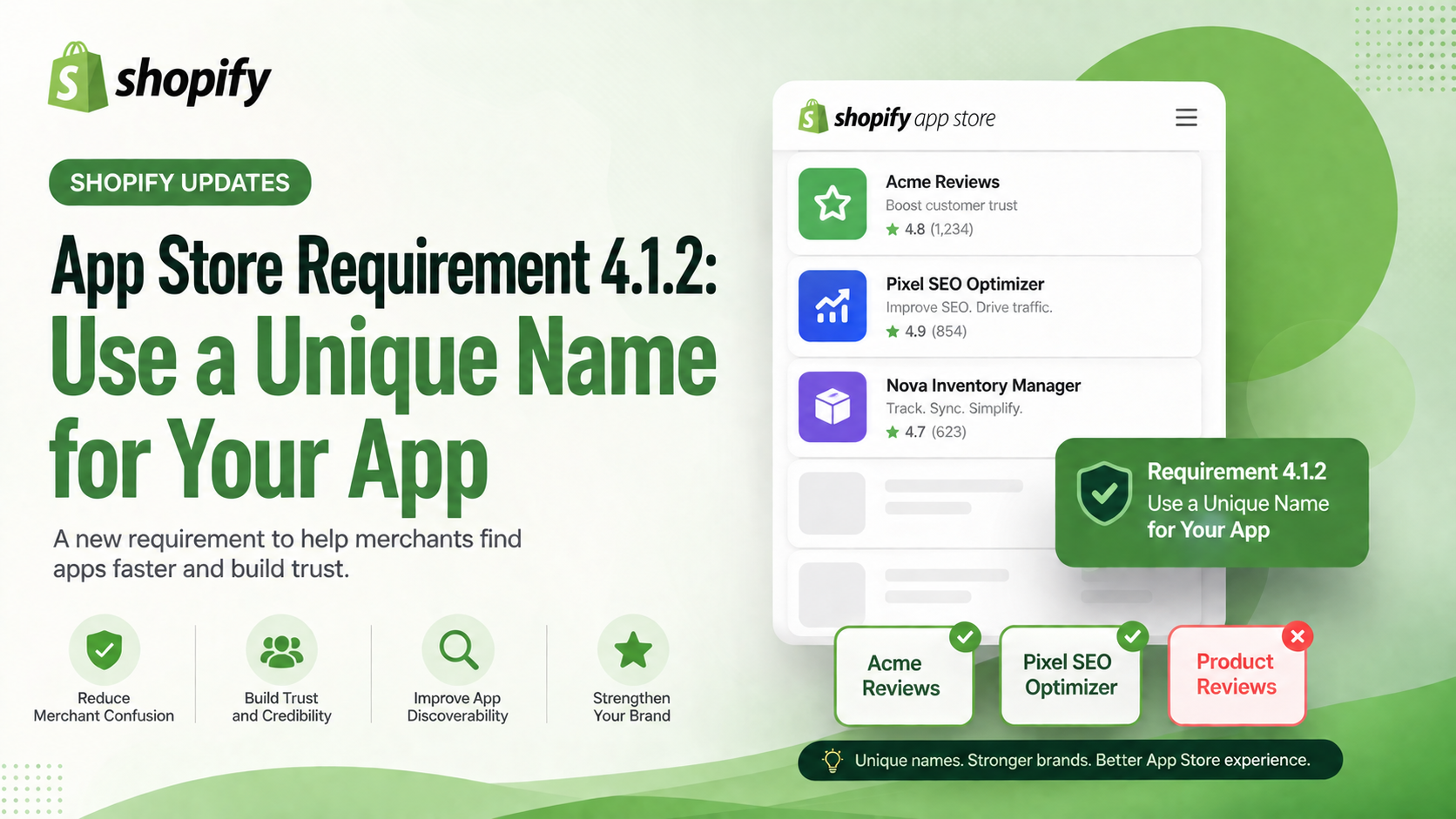
Shopify has introduced a new App Store Requirement (4.1.2) that requires every app published on the Shopify App Store to have a unique and recognizable name. The goal is to reduce merchant confusion caused by duplicate or copycat app names.

App Store Requirement 4.1.2: Use a Unique Name for Your App
4 sections

What's New?

Under the new requirement, your app name must:

  • Include a distinctive brand identifier.
  • Be unique among all apps in the Shopify App Store.
  • Not be identical or confusingly similar to another app, company, brand, or Shopify product.
  • For example:

    Acme ReviewsPixel SEO OptimizerNova Inventory Manager

    Instead of generic names like:

    ❌ Product Reviews ❌ SEO Booster ❌ Inventory Sync

    These generic names are more likely to be rejected because they don't clearly distinguish your app from others.

    Why Is Shopify Making This Change?

    Merchants often discover apps by searching the Shopify App Store. When multiple apps share nearly identical names, it becomes difficult to determine which app belongs to which developer.

    By enforcing unique app names, Shopify aims to:

  • Improve merchant trust.
  • Reduce impersonation and copycat branding.
  • Make app discovery easier.
  • Strengthen developer branding.
  • What Should Developers Do?

    If you're planning to publish a new app—or update an existing one—you should:

  • Choose a brand-first app name instead of a feature-first name.
  • Search the Shopify App Store to ensure your name isn't already in use.
  • Use the same app name consistently across your Partner Dashboard, App Store listing, website, and marketing materials.
  • Final Thoughts

    Although this may seem like a small policy update, it's an important step toward creating a cleaner and more trustworthy Shopify App Store.

    A unique app name not only helps you meet Shopify's requirements but also strengthens your brand identity and makes it easier for merchants to remember and recommend your app.

    If you're developing Shopify apps, now is a good time to review your app's branding before your next submission.

    Tags

    Related Articles

    Why the Removal of automaticDiscounts Impacts Your Shopify Apps (and How to Fix It)
    Platform Updates

    Why the Removal of automaticDiscounts Impacts Your Shopify Apps (and How to Fix It)

    Shopify’s 2027-01 API version drops the automaticDiscounts query, breaking apps that read automatic discounts. Learn what changed, who’s affected, and step‑by‑step migration to discountNodes so your app stays functional.

    September 18, 20264 min
    Navigating Shopify’s New UI Extension Bundle Size Exception Process
    Platform Updates

    Navigating Shopify’s New UI Extension Bundle Size Exception Process

    Shopify now caps UI extension bundles at 64 KB (128 KB for full‑page account extensions) and offers a formal exception request. Learn who’s affected, how to optimize, and the exact steps to submit a bundle size exception before the October 2026 deadline.

    September 17, 20264 min
    Unlocking Market Hierarchies: New GraphQL Admin API Fields for 2026-10
    Platform Updates

    Unlocking Market Hierarchies: New GraphQL Admin API Fields for 2026-10

    Shopify’s 2026-10 API now lets apps query parent‑child market relationships directly. Learn what changed, who it affects, and how to integrate the new marketRelationships query with actionable code examples.

    September 17, 20264 min
    Mark Unreceived Stock with the New CANCELED Receive Action in Shopify’s Inventory Shipments API
    Platform Updates

    Mark Unreceived Stock with the New CANCELED Receive Action in Shopify’s Inventory Shipments API

    Shopify’s 2026-10 API adds a CANCELED receive action for inventory shipments, letting apps record units that will never arrive. Learn what changed, who it affects, and how to implement the new fields, enum, and webhook updates.

    September 17, 20264 min