If the previous Shopify Editions treated AI like a novelty sidebar, the Spring ’26 Edition makes it an operational reality.
Shopify’s native AI assistant, Sidekick, has officially outgrown its role as a passive text generator. In this release, Shopify has transformed Sidekick into an active, multi-tasking, cross-app business assistant capable of taking asynchronous action on your behalf.
For merchants managing complex operations, hardware specification catalogs, or deep app stacks, this upgrade drastically changes how a backend is managed. Here is a technical teardown of the major architectural and functional upgrades to Sidekick this season.
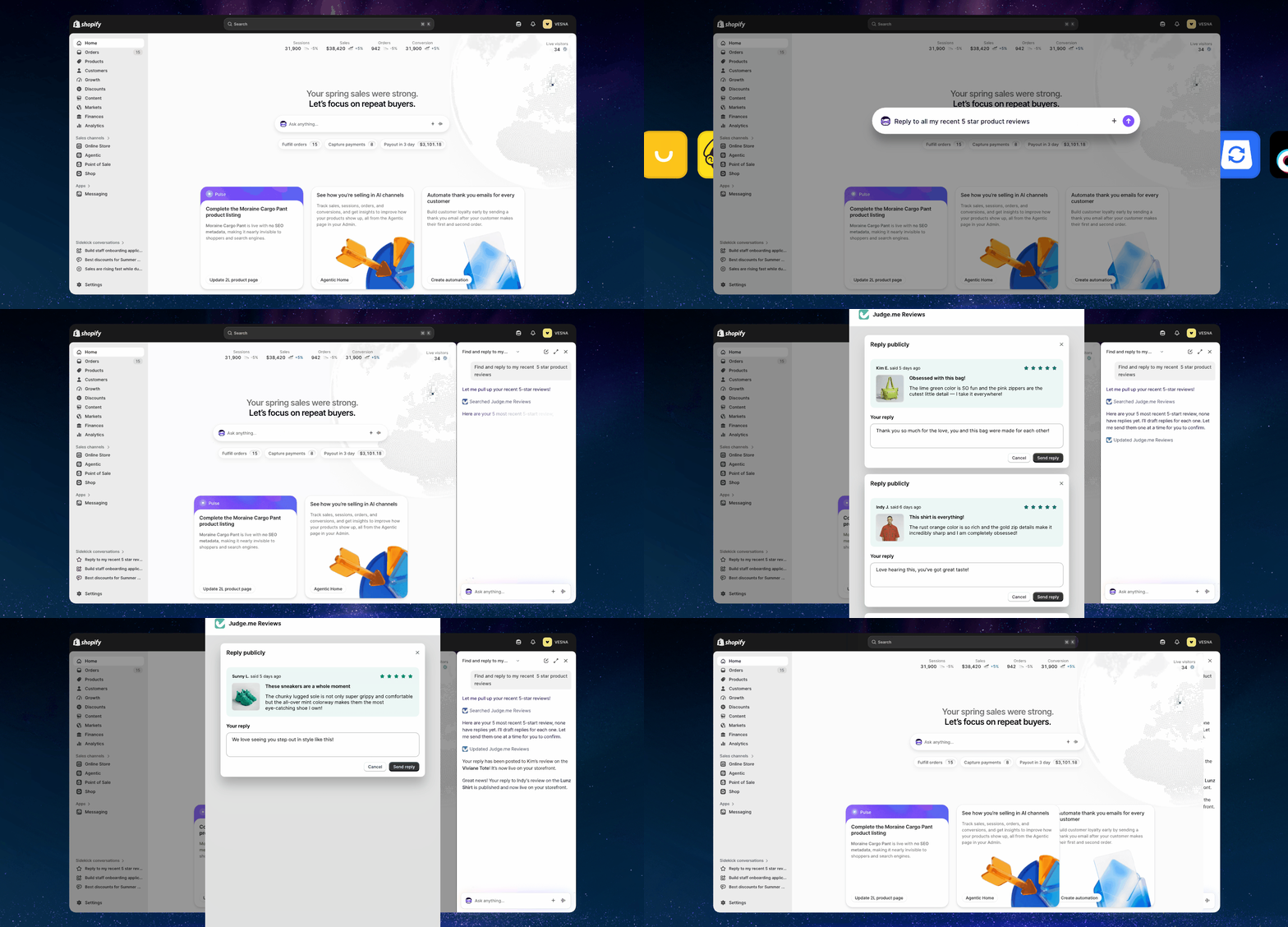
1. Deep Ecosystem Integration via Sidekick App Extensions
Historically, Sidekick’s context ended at the edge of the native Shopify admin. If you wanted to query your email marketing flows, check loyalty points, or manage subscription returns, you had to jump out of the chat and load individual third-party dashboards.
With the introduction of Sidekick App Extensions (specifically Data and Action extensions), developers can now plug their third-party apps directly into the conversational UI. Sidekick launched native support for heavy-hitter ecosystem partners, including:
Instead of compiling data across disparate systems, you can now issue unified cross-app prompts:
"Cross-reference our low-stock alerts with our VIP tier in Smile and draft a targeted back-in-stock notification flow inside Klaviyo."
2. Shift to Proactive Intelligence: Sidekick Pulse
Sidekick has shed its purely reactive nature. With Sidekick Pulse, the assistant actively monitors store metrics, user sessions, and inventory health in the background.
Instead of waiting for you to type a prompt, Pulse generates a personalized feed of actionable recommendations the moment you open your Shopify Admin.
3. Asynchronous Execution & Multi-Tasking
In older iterations of Shopify Magic, the chat window was a blocking interface—if you issued a complex generation or data-crunching task, you had to keep the window open and wait.
The Spring ’26 upgrade introduces true background orchestration. Sidekick can now process multiple complex tasks simultaneously and continue running tasks asynchronously after you navigate away from the panel to focus on design adjustments or catalog configurations.
To reduce conversational friction during multi-step tasks, Sidekick now utilizes multiple-choice clarification prompts. Instead of guessing what you mean when a query is ambiguous, it presents exact options to streamline the execution loop.
4. Operational Automation: Flow and Form Autofill
For operations and development teams, the most practical time-saving upgrades land in data entry and backend testing:
5. Ubiquitous Hardware & Mobile Access
Managing a physical retail space or warehouse environment requires a hands-free workflow. Sidekick’s mobile presence has been overhauled with a persistent editing preview state and native integration onto the Apple Watch. Merchants can now use voice-driven commands to check unfulfilled order queues, run quick revenue comparisons against the previous week, or surface live inventory levels entirely hands-free.
Summary: The New Operational Baseline
Capability
Old Sidekick (Reactive Chat)
New Sidekick (Junior Teammate)
Context Boundary
Only native Shopify core admin data.
Deeply integrated into 3rd-party app ecosystems (Klaviyo, Loop, etc.).
Execution Style
Single-tasking, blocking interface.
Multi-tasking, asynchronous background processing.
Engagement Model
Waits entirely for human prompts.
Proactive metric-flagging via Sidekick Pulse.
Logic Validation
Manual dummy checkouts required.
Automated event generation for Shopify Flow testing.
This update represents a fundamental pivot in store management: your primary administration tool is no longer just a series of buttons and menus, but a unified conversational engine capable of operating your entire e-commerce ecosystem.
Deep Dive for Developers
To see how these changes directly reshape workflows, webhooks, and app extensions under the hood, check out this comprehensive overview:
Shopify's Biggest AI Update Yet (Editions 2026)
This developer-focused breakdown features a direct interview with Shopify's VP of Product, offering an honest evaluation of Sidekick's new capabilities, the technical realities of generating apps via AI, and how engineering teams can leverage the new Sidekick AI Extensions.