Simplify Your Digital Sales: A Review of Shopify’s Native "Digital Downloads" App
In the world of e-commerce, selling physical goods is only half the story. Whether you are an artist selling digital prints, a musician offering high-fidelity tracks, or an author distributing eBooks, the ability to sell intangible assets is a powerful way to scale your business.
In the world of e-commerce, selling physical goods is only half the story. Whether you are an artist selling digital prints, a musician offering high-fidelity tracks, or an author distributing eBooks, the ability to sell intangible assets is a powerful way to scale your business.
For Shopify merchants, the most straightforward solution to this is the Digital Downloads app, developed by Shopify itself. But is this free, native tool the right choice for your specific business needs? Let’s dive into a review of its features, pros, and limitations.
Digital Downloads is Shopify’s official, free-to-use application designed to help merchants upload and sell digital files directly from their store. It removes the friction of manual fulfillment, allowing you to automatically deliver files to customers the moment their payment is confirmed.
Key Features at a Glance
Seamless Integration: Since it is built by Shopify, it lives natively in your Shopify admin. You won’t need to worry about third-party bridging software or complicated API connections.
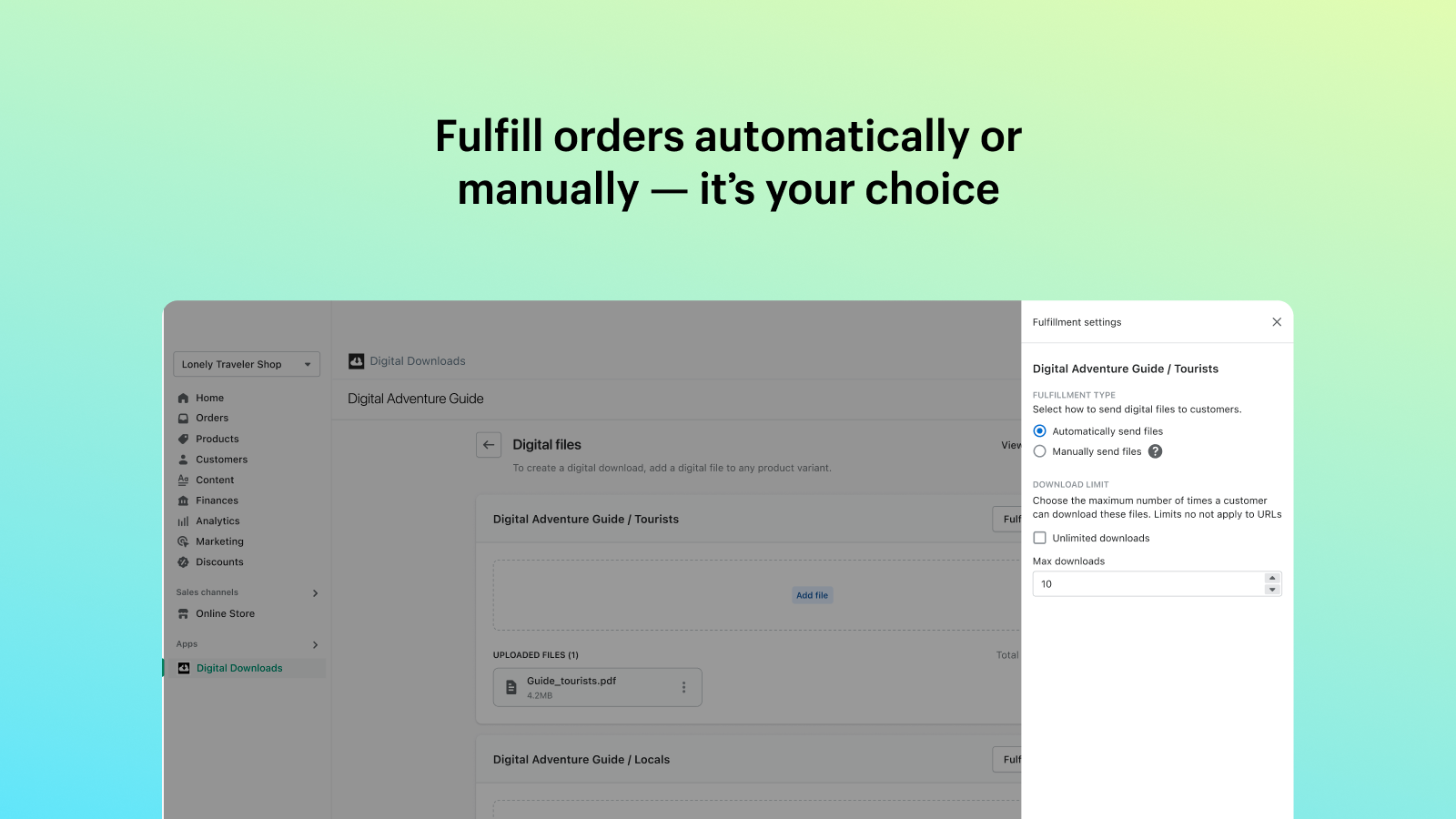
Automatic Fulfillment: Once a customer completes their purchase, they are automatically emailed a secure download link. You can also configure the order to be marked as "fulfilled" instantly.
Flexible File Support: You can attach various file types—such as PDFs, JPEGs, and ZIP files—to your products. The app supports individual file sizes up to 5GB.
Customizable Download Limits: To prevent link sharing or piracy, you can limit the number of times a customer is allowed to download a specific file.
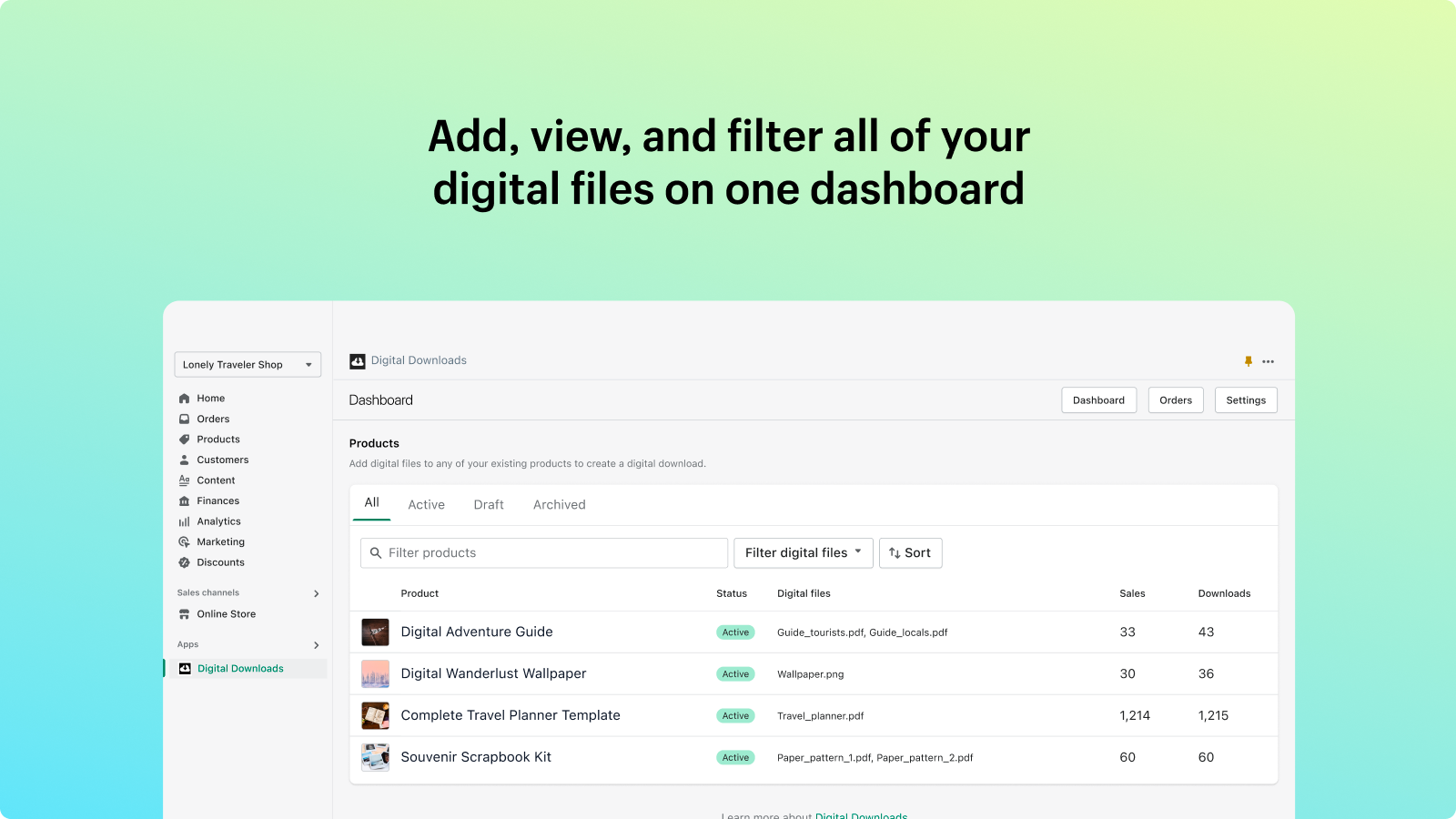
Order Management: A dedicated dashboard within the app allows you to filter orders by digital status, see how many times a link has been accessed, and resend download links if a customer loses their email.
The Pros: Why Merchants Love It
Zero Cost: For many businesses, especially those just starting out, the fact that this app is free is a massive advantage. It provides all the core functionality needed to get up and running without adding to your monthly software overhead.
User-Friendly Interface: The app’s design is clean and minimal. It integrates directly into the product page, meaning you can manage your inventory and digital attachments without constantly switching screens.
Reliability: Because it is part of Shopify’s core infrastructure, merchants generally report high reliability with file delivery. You don’t have to worry about third-party server downtime impacting your sales.
Potential Limitations to Consider
While the app is excellent for beginners, it does have a "no-frills" approach. Here is where you might find yourself needing more than what this app offers:
Limited Advanced Security: If you are selling high-value digital assets (like proprietary software or expensive courses), you might find the lack of "PDF stamping" (adding a customer’s name to the file to track leaks) or advanced IP-address tracking a downside.
No License Key Management: If you are looking to sell software that requires unique activation codes or license keys, this app is not for you. You would need to look toward third-party alternatives like specialized digital delivery apps.
Basic Customization: The email templates are functional, but highly customized, brand-heavy delivery experiences might be restricted by the app’s standard template structure.
Final Verdict: Is it right for you?
The Digital Downloads app is perfect for:
Creators selling simple digital products like eBooks, art prints, music, or patterns.
Small-to-medium-sized businesses that want a "set it and forget it" solution.
Merchants who value a clean, native interface and want to avoid extra monthly costs.
You might want to look elsewhere if:
You require complex protection features like PDF stamping or dynamic watermarking.
You need to distribute unique, one-time-use license keys for software.
You require advanced reporting and analytics that go beyond basic download counts.
Conclusion
Shopify’s Digital Downloads app is the "gold standard" for simplicity. It performs its primary job—delivering your files to customers—reliably and without complexity. For the vast majority of creators, it is the best place to start. If you eventually outgrow its feature set, the beauty of the Shopify ecosystem is that you can easily migrate to a more advanced, specialized app later.
Ready to start selling your digital goods? Head over to the Shopify App Store and install it today to see how it can streamline your store’s workflow.