
Convert a Shopify Section to a Block (Horizon Theme version)

In Horizon, Shopify allows developers to convert standalone sections into reusable blocks, giving merchants even more control in the theme editor. Let’s walk through the process step by step.

Convert a Shopify Section to a Block (Horizon Theme version)
7 sections

Shopify’s new Horizon theme architecture introduces more flexible ways to design pages, thanks to updates in how sections and blocks work. If you’ve been building themes for a while, you might be familiar with the old model where sections controlled the layout and blocks were limited inside those sections.

In Horizon, Shopify allows developers to convert standalone sections into reusable blocks, giving merchants even more control in the theme editor. Let’s walk through the process step by step.

1. Understand the Difference Between Sections and Blocks

  • Sections
  • Top-level containers on a page.
  • Can include multiple blocks inside them.
  • Used for big layout elements (e.g., hero banners, product grids, footers).
  • Blocks
  • Child elements inside sections.
  • Previously limited to “sub-content” (like text, buttons, or images).
  • Now in Horizon, blocks can be promoted so they behave like mini-sections.
  • 👉 Example: Instead of merchants adding a whole “Image with Text” section, you can now let them add an image block anywhere inside a section.

    2. Original Section Schema Example

    Let’s say you have a section called section/image-with-text.liquid:

    This is a section — it appears as a big component in the theme editor.

    3. Convert Section to a Block

    You’ll move it inside blocks section or create a new block file blocks/image-with-text.liquid. Then, paste the content.

    4. Update the Markup

    Inside the liquid content of a new block file, replace anything section. by block.

    5. Benefits in Horizon

  • Merchants can reorder blocks more easily.
  • Developers can reduce the number of separate sections.
  • Layouts become more modular and flexible.
  • Works smoothly with Shopify’s new nested blocks and drag-and-drop editor in Horizon.
  • 6. Best Practices

  • Keep your sections as containers and blocks as repeatable units.
  • Use presets to make it easier for merchants to add common block combinations.
  • Test in the theme editor to confirm that merchants can drag, drop, and customize without confusion.
  • Final Thoughts

    The new Horizon theme structure blurs the line between sections and blocks, making Shopify themes more modular and customizable than ever. By converting old sections into blocks, you give merchants granular control over their store’s design while keeping your theme lightweight and future-proof.


    Tags

    Related Articles

    10 Essential Shopify SEO Tips to Boost Your Store's Traffic
    Tips & Tricks

    10 Essential Shopify SEO Tips to Boost Your Store's Traffic

    Optimize your Shopify store for search engines with these 10 actionable SEO tips, covering setup, keywords, on-page optimization, and technical fixes. Improve your store's visibility, drive more traffic, and increase sales. Get started with Shopify SEO today!

    August 16, 20263 min
    Adding a Smooth Back-to-Top Button to Your Shopify Theme
    Tips & Tricks

    Adding a Smooth Back-to-Top Button to Your Shopify Theme

    Learn how to add a smooth back-to-top button to your Shopify theme using lightweight CSS and JS, improving navigation and enhancing user experience.

    August 13, 20263 min
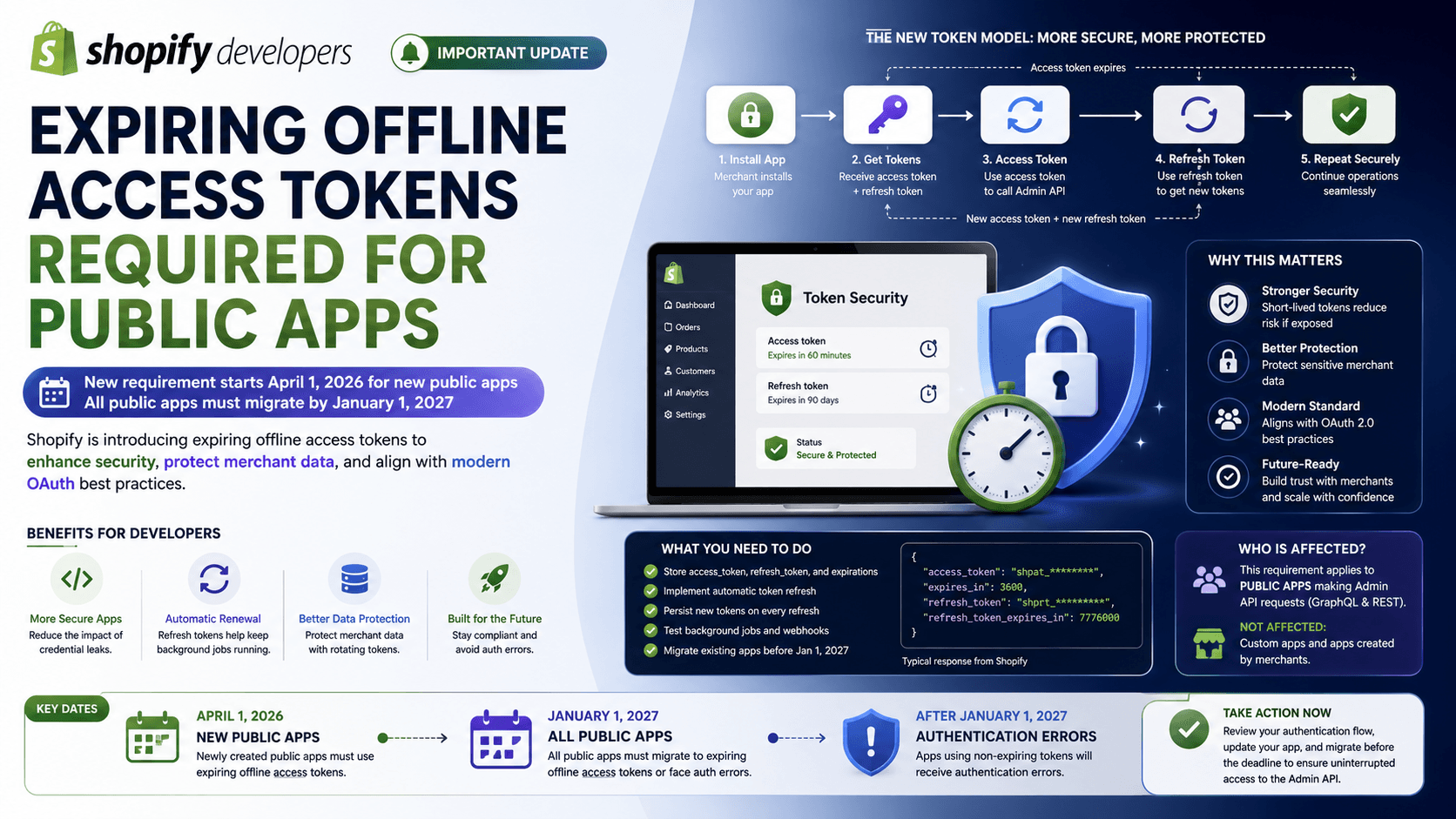
    Shopify Requires Expiring Offline Access Tokens for Public Apps: What Developers Need to Know
    Tips & Tricks

    Shopify Requires Expiring Offline Access Tokens for Public Apps: What Developers Need to Know

    Shopify is making an important change to how public apps authenticate with the Admin API

    August 8, 202630 min
    Understanding Shopify Theme Check: LiquidHTML/Complexity
    Tips & Tricks

    Understanding Shopify Theme Check: LiquidHTML/Complexity

    Although this isn't a compilation or runtime error, it's an important indicator that your Liquid file has become too complex, making it harder to read, maintain, and extend over time

    July 30, 202620 min