Fixing 404 Errors on Shopify Using URL Redirects

By using Shopify’s URL Redirects, you can quickly fix 404 errors, maintain SEO rankings, and improve customer experience.

Fixing 404 Errors on Shopify Using URL Redirects
0 sections

Why Are You Seeing 404 Errors?

A 404 error occurs when a page is missing or has been deleted, and Google is still trying to access it. This can negatively impact SEO and user experience. To fix this, you can redirect the broken URL to a relevant page using Shopify’s built-in URL Redirect feature.

Step 1: Identify 404 Errors in Google Search Console

  • Log in to Google Search Console.
  • Select your Shopify site.
  • In the left menu, go to PagesNot Found (404).
  • Review the list of broken URLs that Google has detected.
  • Step 2: Redirect Broken URLs in Shopify

    Access the URL Redirect Tool

  • Log in to your Shopify Admin.
  • Click on Content → Menus (old path is Online StoreNavigation)
  • Scroll down and click URL Redirects top-right button.
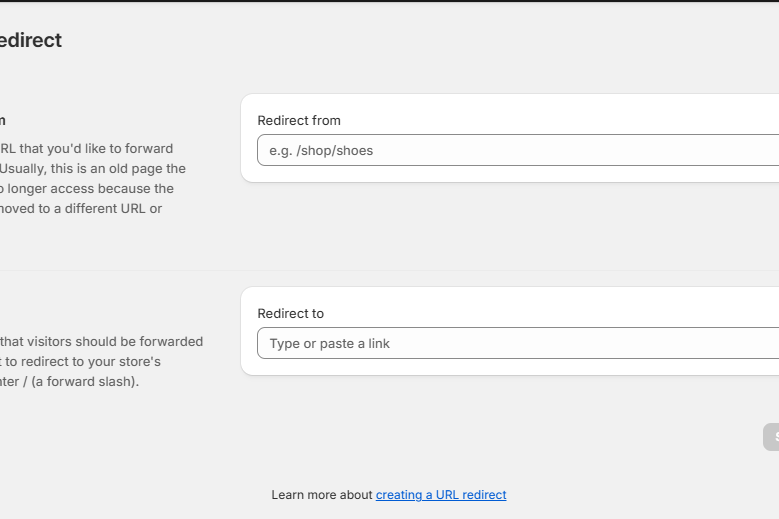
  • Click the Create URL redirect button.
  • Add a Redirect for Each Broken URL

  • In the Redirect from field, enter the old/broken URL (e.g., /old-product-page).
  • In the Redirect to field, enter the new/correct URL (e.g., /new-product-page).
  • Click Save Redirect.
  • 🛑 Important: Shopify only supports redirects for URLs after the domain (e.g., /old-page), not full URLs like https://yourstore.com/old-page.

    Step 3: Verify the Redirect Works

  • Open your browser and enter the old URL (e.g., yourstore.com/old-product-page).
  • Ensure it correctly redirects to the new URL.
  • If it doesn’t work, clear your browser cache and test again.
  • Step 4: Notify Google to Update Indexing

    After setting up redirects, inform Google to re-crawl your site:

  • Go back to Google Search Console.
  • Click on the URL Inspection Tool in the left menu.
  • Enter the old URL and check the status.
  • If it still shows 404, click Request Indexing to speed up the update.
  • Best Practices for URL Redirects in Shopify

    ✅ Redirect old product pages to new relevant products or collections. ✅ Avoid redirect chains (URL A → URL B → URL C). Instead, directly redirect A → C. ✅ Regularly check Google Search Console for new 404 errors.

    Conclusion

    By using Shopify’s URL Redirects, you can quickly fix 404 errors, maintain SEO rankings, and improve customer experience. If you continue seeing 404 errors, consider reviewing deleted pages and updating your site’s navigation.


    Tags

    Related Articles

    Adding a Smooth Back-to-Top Button to Your Shopify Theme
    Tips & Tricks

    Adding a Smooth Back-to-Top Button to Your Shopify Theme

    Learn how to add a smooth back-to-top button to your Shopify theme using lightweight CSS and JS, improving navigation and enhancing user experience.

    August 13, 20263 min
    Shopify Requires Expiring Offline Access Tokens for Public Apps: What Developers Need to Know
    Tips & Tricks

    Shopify Requires Expiring Offline Access Tokens for Public Apps: What Developers Need to Know

    Shopify is making an important change to how public apps authenticate with the Admin API

    August 8, 202630 min
    Understanding Shopify Theme Check: LiquidHTML/Complexity
    Tips & Tricks

    Understanding Shopify Theme Check: LiquidHTML/Complexity

    Although this isn't a compilation or runtime error, it's an important indicator that your Liquid file has become too complex, making it harder to read, maintain, and extend over time

    July 30, 202620 min
    Migrating from PrestaShop to Shopify
    Tips & Tricks

    Migrating from PrestaShop to Shopify

    Migrating an e-commerce store from an open-source platform like PrestaShop to a hosted SaaS solution like Shopify is a common step for growing businesses looking to simplify store management and infrastructure overhead.

    July 24, 202615 min