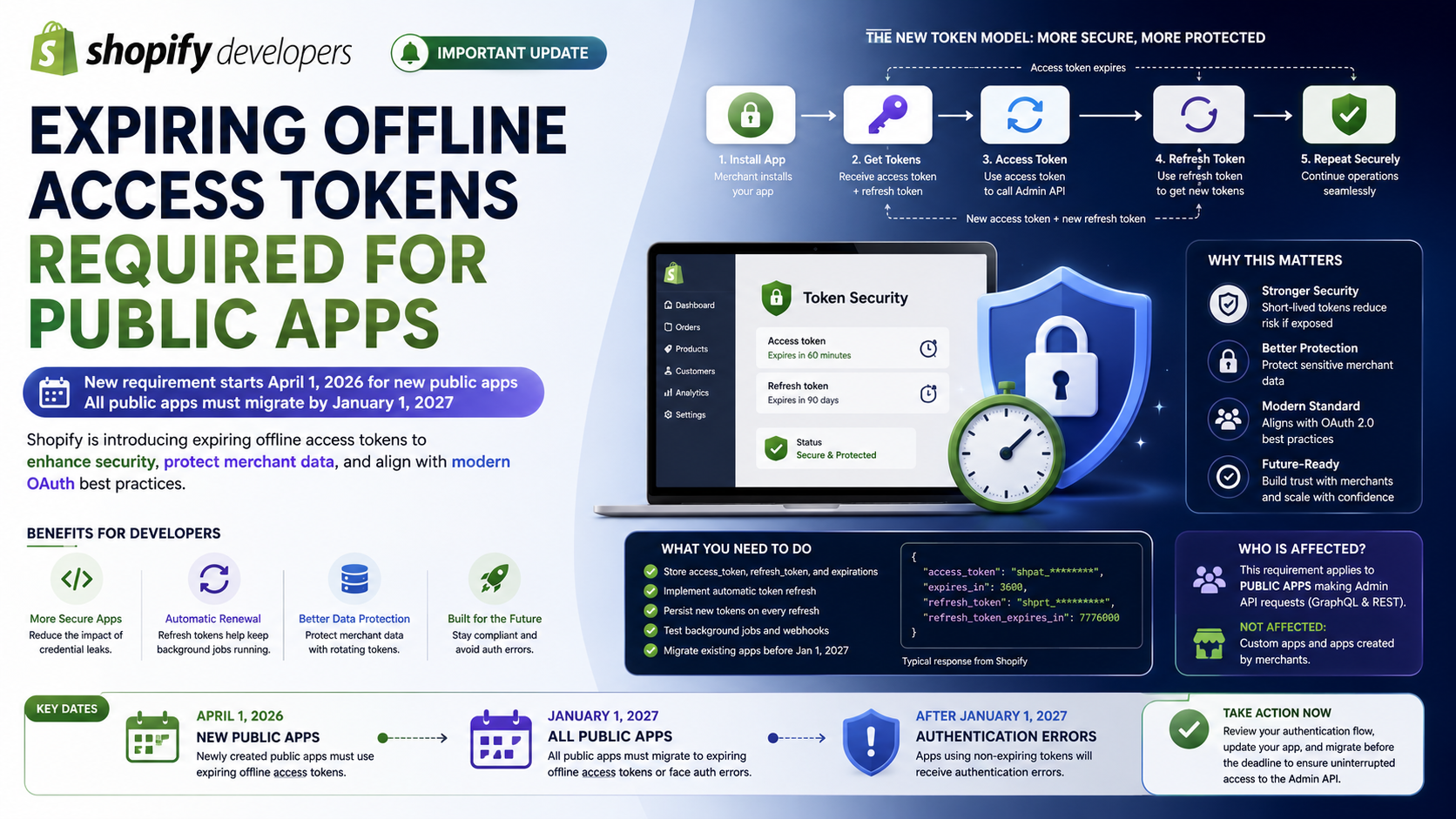
Starting April 1, 2026, newly created public apps must use expiring offline access tokens when making Admin API requests. Shopify introduced this requirement to improve merchant data protection and bring app authentication closer to modern OAuth security practices.
But there is an important update developers should know about today: Shopify has since announced that all public apps must use expiring offline access tokens by January 1, 2027, including public apps created before April 1, 2026.
This article explains what is changing, how offline access tokens work, why Shopify is making this change, and what developers need to do to prepare.
What Is an Offline Access Token?
When a Shopify app communicates with the Admin GraphQL API or Admin REST API, it needs an access token to authenticate its requests.
Shopify provides two main access modes:
Offline access is particularly useful for tasks such as:
For example, imagine an inventory application that synchronizes Shopify inventory with an ERP system every hour.
The merchant doesn't need to open the app every hour. The background process can use an offline access token to communicate with Shopify.
This makes offline tokens extremely useful—but their long lifetime also creates a security concern.
What Is Changing?
Historically, Shopify offline access tokens could remain valid indefinitely.
A non-expiring token could continue working until the merchant uninstalled the app or the app's credentials were revoked.
Shopify has now introduced expiring offline access tokens.
The new model gives the app:
According to Shopify's current documentation, expiring offline access tokens provide a 60-minute access-token lifetime and a 90-day refresh-token lifetime.
Conceptually, the authentication flow changes from:
Install App
↓ Get Offline Token
↓ Use the same token indefinitely
to:
Install App
↓ Get Access Token + Refresh Token
↓ Use Access Token
↓ Access Token Expires
↓ Use Refresh Token
↓ Get New Access Token + New Refresh Token
↓ Continue Background Operations
This rotation significantly reduces the security impact if an access token is accidentally exposed.
Which Shopify Apps Are Affected?
The original April 1, 2026 announcement applies to public apps created on or after April 1, 2026 that make Admin API requests.
However, Shopify has now expanded the requirement.
From January 1, 2027
All public apps making Admin API requests must use expiring offline access tokens.
That includes:
After January 1, 2027, public apps that continue using non-expiring offline access tokens will receive authentication errors when making Admin API requests.
Apps that are not affected
The requirement does not apply to:
This distinction is important because not every Shopify app needs to go through the same migration process.
Why Is Shopify Making This Change?
The primary reason is security.
Consider a traditional non-expiring token.
If an access token is accidentally exposed in:
the token could potentially be used for a very long time.
With an expiring token, the attack window is much smaller.
Instead of:
Token leaked
↓ Potentially valid indefinitely
the model becomes:
Token leaked
↓ Limited lifetime
↓ Token expires
↓ Attacker loses access
Shopify says this change is intended to enhance merchant data protection and align with modern OAuth practices.
How Expiring Offline Access Tokens Work
Let's look at the new model in more detail.
When your app obtains an expiring offline access token, Shopify returns information similar to:
{
  "access_token": "shpat_xxxxxxxxx",
  "expires_in": 3600,
  "refresh_token": "shprt_xxxxxxxxx",
  "refresh_token_expires_in": 7776000,
  "scope": "write_products,read_orders"
}
The important fields are:
access_token
This is the credential your application uses when making authenticated Admin API requests.
expires_in
This tells your application how long the access token remains valid.
For expiring offline tokens, Shopify currently returns 3600 seconds, or approximately 60 minutes.
refresh_token
This is used to obtain a new access token after the current access token expires.
refresh_token_expires_in
Shopify currently provides a 90-day lifetime for refresh tokens.
What Happens When the Access Token Expires?
Your application shouldn't ask the merchant to authenticate every hour.
Instead, your backend should automatically refresh the token.
The process looks like this:
Access Token
↓ Expires
↓ Backend detects expiration
↓ Send refresh_token to Shopify
↓ Shopify returns: New access token + New refresh token
↓ Store the new credentials
↓ Continue API requests
Shopify's refresh endpoint uses the refresh_token grant:
POST https://{shop}.myshopify.com/admin/oauth/access_token
with:
grant_type=refresh_token client_id={client_id} client_secret={client_secret} refresh_token={refresh_token}
Shopify then returns a new access token and a new refresh token.
An Important Detail: Refresh Tokens Rotate
Developers should pay close attention to this behavior.
When Shopify refreshes an expiring offline token, it provides a new access token and a new refresh token. The previous access token remains valid until its expiration period ends, but the previous refresh token is invalidated after successful use.
That means your application should not simply keep using the original refresh token.
Your storage logic should effectively do this:
Old Access Token Old Refresh Token
↓ Refresh
↓ New Access Token New Refresh Token
↓ Save BOTH new values
Failing to persist the new refresh token can eventually cause your application's background processes to stop working.
What Happens If the Refresh Token Expires?
There is another important consideration.
A refresh token currently has a 90-day lifetime.
If the refresh token expires, Shopify can no longer use it to generate a new access token. In that situation, the app needs to reacquire credentials through the appropriate token acquisition flow when the merchant next launches the app.
This means developers should think about token management as an ongoing lifecycle rather than a one-time installation step.
How Should Developers Store Tokens?
If your application previously stored only one value:
access_token
you now need to store additional metadata.
At minimum, Shopify recommends storing information such as:
access_token expires_at refresh_token refresh_token_expires_at
This allows your backend to determine whether the current access token is still valid and when it needs to be refreshed.
A database record might conceptually look like:
shop
--------------------------------
example.myshopify.com
access_token
shpat_xxxxxxxxx
expires_at
2026-08-13 11:30:00
refresh_token
shprt_xxxxxxxxx
refresh_token_expires_at
2026-11-11 10:30:00
Never store these credentials in frontend JavaScript or expose them to the browser.
They should be handled securely by your server-side application.
What About Existing Public Apps?
This is where developers need to pay attention.
If you maintain an existing public Shopify app created before April 1, 2026, the original April 1 deadline does not mean you are immediately blocked.
However, Shopify's newer policy sets a broader deadline:
January 1, 2027 — all public apps must use expiring offline access tokens.
Existing public apps therefore need to migrate before that date.
The good news is that Shopify supports migrating an existing non-expiring offline token to an expiring one using token exchange.
Migrating an Existing Token
Shopify provides a migration path from non-expiring offline tokens to expiring offline tokens.
The migration uses the token exchange flow and requests:
expiring=1
The request conceptually looks like:
POST https://{shop}.myshopify.com/admin/oauth/access_token
with parameters including:
grant_type=urn:ietf:params:oauth:grant-type:token-exchange subject_token={non_expiring_offline_token} subject_token_type=urn:shopify:params:oauth:token-type:offline-access-token requested_token_type=urn:shopify:params:oauth:token-type:offline-access-token expiring=1
Shopify returns a new expiring access token and refresh token.
Be careful: migration is irreversible
Once the migration succeeds, the original non-expiring token is revoked.
Developers should therefore make sure their application is ready to store and refresh the new credentials before performing the migration.
Does This Affect REST and GraphQL?
Yes.
The policy applies to public apps making Admin API requests through both:
This means switching from REST to GraphQL does not avoid the requirement.
The important part is the authentication method used by the public app.
What If You Use Shopify's App Templates?
There is some good news for developers starting a new application.
Shopify states that if you use its app templates and libraries, expiring offline access token handling is already supported in the relevant authentication flow.
This is one reason developers should avoid building Shopify authentication entirely from scratch unless there is a specific reason to do so.
Using Shopify's recommended tooling can reduce the amount of authentication code your team needs to maintain.
A Practical Migration Checklist
If you maintain a Shopify public app, now is a good time to review your authentication implementation.
1. Identify how your app stores tokens
Check whether your database stores only:
access_token
If so, you likely need to extend the session/token storage model.
Add fields for:
expires_at refresh_token refresh_token_expires_at
2. Check your OAuth implementation
Confirm that your app requests:
expiring=1
when obtaining an expiring offline access token.
Shopify supports this through both authorization code grant and token exchange flows.
3. Implement automatic token refresh
Your backend should check the token expiration before performing background Admin API operations.
If the token has expired—or is about to expire—refresh it before making the API request.
4. Store the new refresh token
Remember that refresh tokens rotate.
After a successful refresh:
Old refresh token → invalidated New refresh token → store it
Do not continue relying on the old refresh token.
5. Test background jobs
Authentication problems don't always appear when a developer opens the app.
Test:
These are exactly the types of operations that rely heavily on offline access.
6. Plan migration before January 1, 2027
If your public app still uses non-expiring offline access tokens, don't wait until the deadline.
Shopify has announced that public apps using non-expiring tokens will receive authentication errors when making Admin API requests after January 1, 2027.
Common Mistakes Developers Should Avoid
Mistake #1: Treating the access token as permanent
The new access token is intentionally temporary.
Your application needs to understand its lifecycle.
Mistake #2: Storing only the access token
An expiring token requires additional metadata and a refresh token.
Without the refresh token, your backend cannot automatically obtain a replacement when the access token expires.
Mistake #3: Forgetting refresh-token rotation
Every successful refresh produces a new refresh token.
Your application should persist the new value immediately.
Mistake #4: Waiting until the deadline
Authentication changes can affect background processes that aren't immediately visible during normal development.
Migration should be tested before production traffic depends on it.
Mistake #5: Assuming custom apps are affected
The current requirement specifically targets public apps. Custom apps and apps created by merchants are not subject to this public-app requirement.
Why This Is a Good Change for the Shopify Ecosystem
At first glance, expiring tokens may seem like additional development work.
However, the change provides an important security improvement.
The old model effectively said:
One credential + Long lifetime = Large security window
The new model is closer to:
Short-lived access token + Rotating refresh token + Automatic renewal = Smaller security window
This is particularly important for Shopify apps because apps can access sensitive merchant information through the Admin API.
Reducing the lifetime of exposed credentials helps protect both merchants and app developers.
Final Thoughts
Shopify's move toward expiring offline access tokens is more than a simple API change. It represents a broader shift toward more secure, modern authentication for the Shopify app ecosystem.
The first important milestone was April 1, 2026, when newly created public apps became required to use expiring offline access tokens. The next major milestone is January 1, 2027, when the requirement expands to all public apps making Admin API requests.
For developers, the key takeaway is simple:
Don't treat Shopify offline access tokens as permanent credentials anymore.
Your application should be designed to:
If your Shopify app performs background API operations, implementing this authentication model correctly is essential for keeping those processes running reliably and securely.