How to Create a Back in Stock Function with Klaviyo on Shopify

Here’s a structured article you could use (blog post, tutorial, or knowledge base) explaining how to create a "Back in Stock" function with Klaviyo on Shopify

How to Create a Back in Stock Function with Klaviyo on Shopify
0 sections

When customers see an “Out of Stock” message, it can mean a lost sale. But with Klaviyo’s Back in Stock feature, you can turn that moment into an opportunity—letting shoppers subscribe for notifications and automatically emailing them once the product is restocked. Here’s a step-by-step guide to setting it up in Shopify.

Why Use Back in Stock Alerts?

  • Recover sales – Customers who sign up are already interested.
  • Improve customer experience – Shoppers don’t need to constantly check back.
  • Collect intent data – Each signup shows demand for specific products.
  • Guide inventory decisions – Identify your most requested items.
  • - Step 1: Install Klaviyo on Your Shopify Store

  • In Shopify admin, go to Apps > Shopify App Store.
  • Search for Klaviyo: Email Marketing & SMS and install it.
  • Connect your Shopify store to your Klaviyo account
  • Once connected, Shopify will sync your product catalog and customer data with Klaviyo.

    - Step 2: Enable Back in Stock in Klaviyo
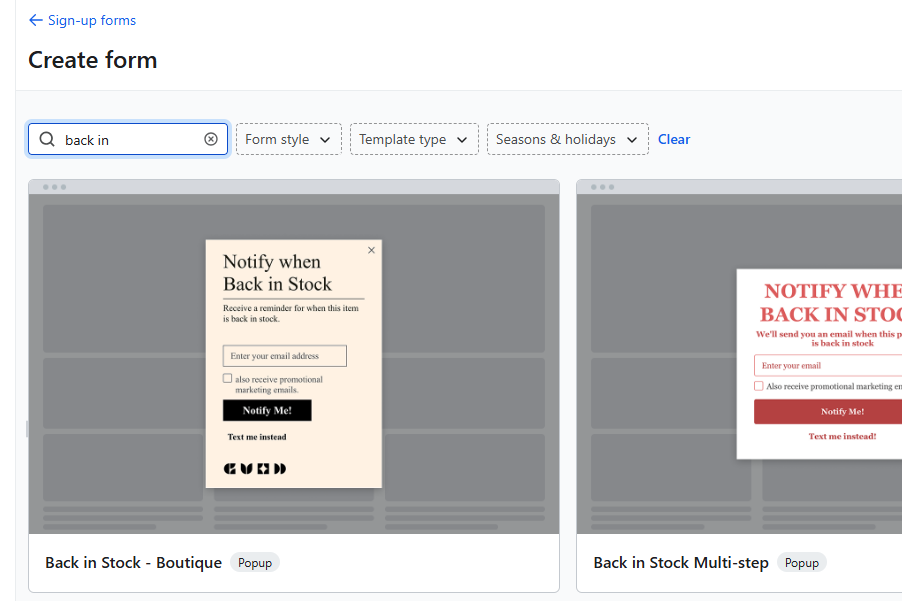
  • Log into Klaviyo Dashboard.
  • Navigate to Signup Forms > Back in Stock (create a new form for the first using)
  • Choose Enable Back in Stock and link it to your Shopify store.
  • Klaviyo will automatically generate a Back in Stock signup form that attaches to out-of-stock product pages.
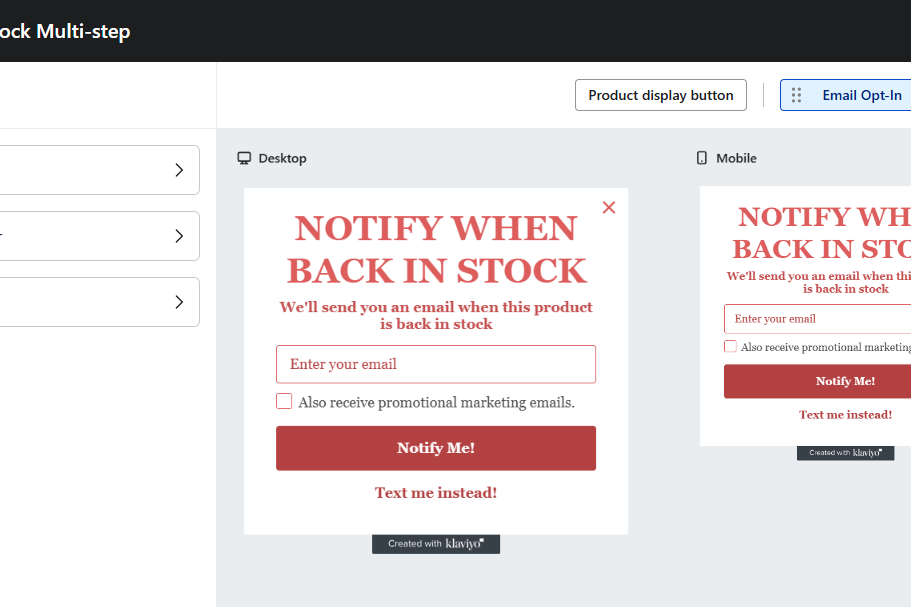
  • - Step 3: Customize the Signup Form

  • Button text – e.g., “Notify Me When Available” instead of “Out of Stock.”
  • Fields – usually just email, but you can add SMS if you want text alerts.
  • Styling – match your theme’s fonts, colors, and button styles.
  • In Shopify, preview the product page and ensure the “Notify Me” button appears when inventory is 0.
    Tags

    Sources

    Related Articles

    Boost Sales Today: The Simple Power of Free Shipping Thresholds for Shopify Stores
    Tips & Tricks

    Boost Sales Today: The Simple Power of Free Shipping Thresholds for Shopify Stores

    Discover how implementing a strategic free shipping threshold can dramatically increase your Shopify store's conversion rates and average order value. Learn quick, actionable steps for both merchants and developers to set up and optimize this powerful tactic within a single day.

    May 16, 20266 min
    Boost Conversions: How to Add a Countdown Timer to Your Shopify Store
    Tips & Tricks

    Boost Conversions: How to Add a Countdown Timer to Your Shopify Store

    Learn how to add an urgency-driving countdown timer to your Shopify product pages and sales promotions. This tutorial covers methods from theme editor blocks to custom Liquid code and when to choose a dedicated app, helping you drive conversions.

    May 14, 20268 min
    Convert a Shopify Section to a Block (Horizon Theme version)
    Tips & Tricks

    Convert a Shopify Section to a Block (Horizon Theme version)

    In Horizon, Shopify allows developers to convert standalone sections into reusable blocks, giving merchants even more control in the theme editor. Let’s walk through the process step by step.

    May 10, 20267 min
    How to Add Tailwind CSS to Shopify
    Tips & Tricks

    How to Add Tailwind CSS to Shopify

    Learn how to add Tailwind CSS to Shopify for faster, responsive design. Enhance your store’s look with clean, utility-first styling. Perfect for theme customization

    May 10, 202615 min